
Let's go for a ride in my automobile. After the stop sign, we'll turn right on Google Drive to discover a few of its user-friendly features.
Google Drive is so many things in one. It is a cloud-based file storage platform, a file creator tool, and a place where you can share and team up with other users. This strong combination is especially useful, and the fact that Google came up with so many other tools like email, a calendar, and contacts makes full integration so easy.

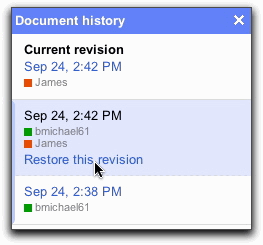
Anytime you type a document and make changes on it, Google Drive will keep a history of your revisions. If you change your mind about something, you can go to the document history to look for that specific document. If you want to keep those changes, you can restore your revisions without having to retype the document from scratch. This really helps to save time and stress.

Putting your documents into folders help to keep you organized. But if you are looking for a specific document, message or photo, it is easier to search by name instead of trying to remember exactly which folder you stored it in. Just type in the name of whatever you are looking for and Google Drive will search for it. Another time saving feature.

Here are some websites where you can get more information about other special features that are included in Google Drive. There is a blog post for Google and some unusual things that Google Drive can do. Also, there are driving tips and how to organize your life.
Enjoy using Google Drive!

No comments:
Post a Comment